
Employee Stock Purchase Plans are programs where participants have an opportunity to purchase shares of company stock (generally) at a discount and (typically) via payroll deductions using after-tax income.
Types of Plans
Qualified (Section 423 Plan)
 Purchase company stock at a discount; postpone recognition of tax on the discount until shares are sold; never any FICA or withholding.
- Income tax trigged by sale; sales tracking required.
- W-2 reports ordinary income and Form 3922 for the prior year’s purchases.
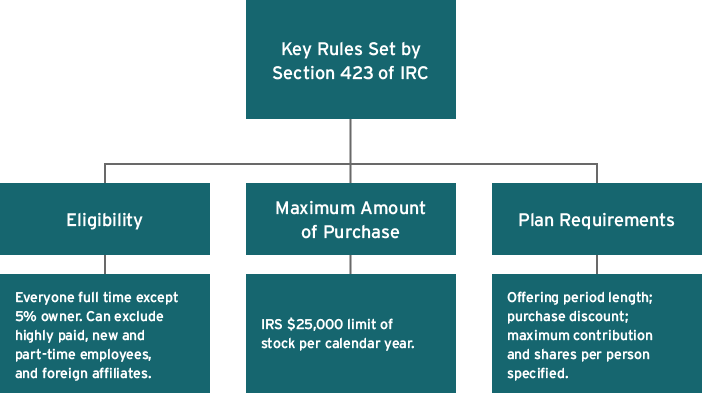
- Significant regulatory requirements (see ‘Key rules set by Section 423 of IRC’ below) and administrative complexities.
Non-qualified Plan
- Purchase company stock, no employee tax advantage available (taxes due at purchase).
- Ordinary income, withholding and FICA on spread, with W-2 reporting similar to Non-qualified Stock Options.
- No Form 3922 needed.
- Company tax deduction when employee recognizes income.
- Fewer regulatory requirements and easier to explain to participants.
- More flexible plan design
Enrollment
Participants apply to enroll in the plan and indicate on their application the percentage or amount of their paycheck they would like to contribute.
- Certain types of compensation may be excluded from contributions.
- Generally, there are limitations on the maximum contribution amounts allowed and the number of shares allowed for purchase.
Contributions then commence for participants until the purchase date (the day on which the company stock is actually bought).
Contributions
This is a percentage or a flat dollar amount of an employee’s paycheck withheld to purchase shares on the purchase date.
Offering Period
The period of time during which payroll deductions are taken from the participant’s paycheck on an after-tax basis.
Offering periods can be either consecutive or overlapping; those in the latter category will often have different purchase prices because of their staggered purchase dates.
Purchase Period
The period of time during which contributions are collected prior to the purchase of shares.
Some plans have a purchase period equal to the length of the offering period while other plans have multiple purchase periods within a single offering period
Purchase
Accumulated funds are used to purchase company shares on the participant’s behalf on the last day of each purchase period.
Lookback Feature (Section 423 Plans)
A lookback provision bases the purchase price not on the stock price at the time of purchase but, rather, on the price either at the beginning of the offering period or at the end of the purchase period, whichever is lower. This ensures the offering-date price stays the same while the purchase-date price changes in longer offering periods with multiple purchase periods.
Example of a 12-month consecutive/fixed offering period with two purchases and a lookback feature:
- 12-month offering period, stock price is $10 at the start, $12 at the end of the first six-month purchase period.
- 15% discount on the purchase date based on the lower of either the price on that date or at the start of the offering.
- Stock purchased at $8.50: 15% off the $10 (29% discount from the $12 market price on the purchase date).
- Stock price is $12 at the start and $10 at six months. Purchase price also $8.50. Reset would apply if part of plan.
| Stock price offering start | $10 |
|---|---|
| Stock price purchase date | $12 |
| Purchase price | $8.50 (15% discount from lower of the two prices with lookback) |
$25,000 Limit (Section 423 Plans)
The IRS limits purchases under a Section 423 plan to $25,000 worth of stock value (based on the grant date fair market value) for each calendar year in which the offering period is effective.
Where an offering spans multiple calendar years (e.g., a 24-month offering), if a participant does not purchase a full $25,000 worth of stock in the first year of the offering, the unused portion of the limitation can be carried forward to the next year and increases the amount of stock the participant can purchase in that year.
IRS $25,000 Rule:
- Calculation of the maximum is based on the undiscounted purchase price at the start of the offering period.
- Company allows contributions up to limit of $25,000 per year. ESPP offers a 15% discount with a lookback.
| Stock price offering start | $10 |
|---|---|
| Stock price purchase date | $12 |
| Purchase price | $8.50 (15% discount from lower price with lookback) |
| Maximum shares to purchase | 2,500 ($25,000 ÷ $10); not 2,941 (2,500 shares x %8.50) |
| Maximum dollar purchase | $21,250 (2,500 shares x %8.50) |
Grant Date
For the grant date to be the beginning of the offering, the maximum number of shares participants in the offering can purchase must be established at that time. Where there is no fixed maximum on the number of shares that participants can purchase, the grant date would not be considered to have occurred until the purchase date. Simply specifying the aggregate number of shares that can be issued under the plan or incorporating the $25,000 limitation into the plan is not sufficient to establish a maximum number of shares that participants can purchase for this purpose. It is acceptable for the plan to specify the maximum as a formula (such as a percentage of participants' compensation divided by the market value, or a percentage of the market value, at the beginning of the offering).
Plan Design
Consider having an omnibus plan that allows for a 423 Qualified Plan for U.S. employees and Country Specific Non-Qualified Plans for international employees.
Includes both a Section 423 and non-Section 423 component
- Non-Section423 component allows for different eligibility and features in other countries
- May exclude part-time employee participation
- Allows exclusion of some countries
- Avoids tainting entire ESPP Offering
- Ensure board resolution outlines any separate offerings
Review if shareholder approval required; shareholder advisory firm considerations
Consider workforce demographics when designing plan
- Ease of enrollment
- Country specific registration or exchange control regulations
- Access to technology
- Quick sale provision
- Price of stock compared to local wages
- Rollover of contributions to next offering period
Administration
Different factors affect the overall administrative needs.
Plan Design
The administrative cost of a plan can vary greatly based on complexity and plan type.

Where Your Employees Are Located
Is your employee base domestic only or global?

Where Does Administration Happen
Do you have the internal resources to administer in-house or are you partnering with an outside vendor?

Due Diligence
Outside resources to help design and maintain ESPP. Very important internationally.

Communications
This can be a large factor in both the overall cost of your ESPP and it's success.


